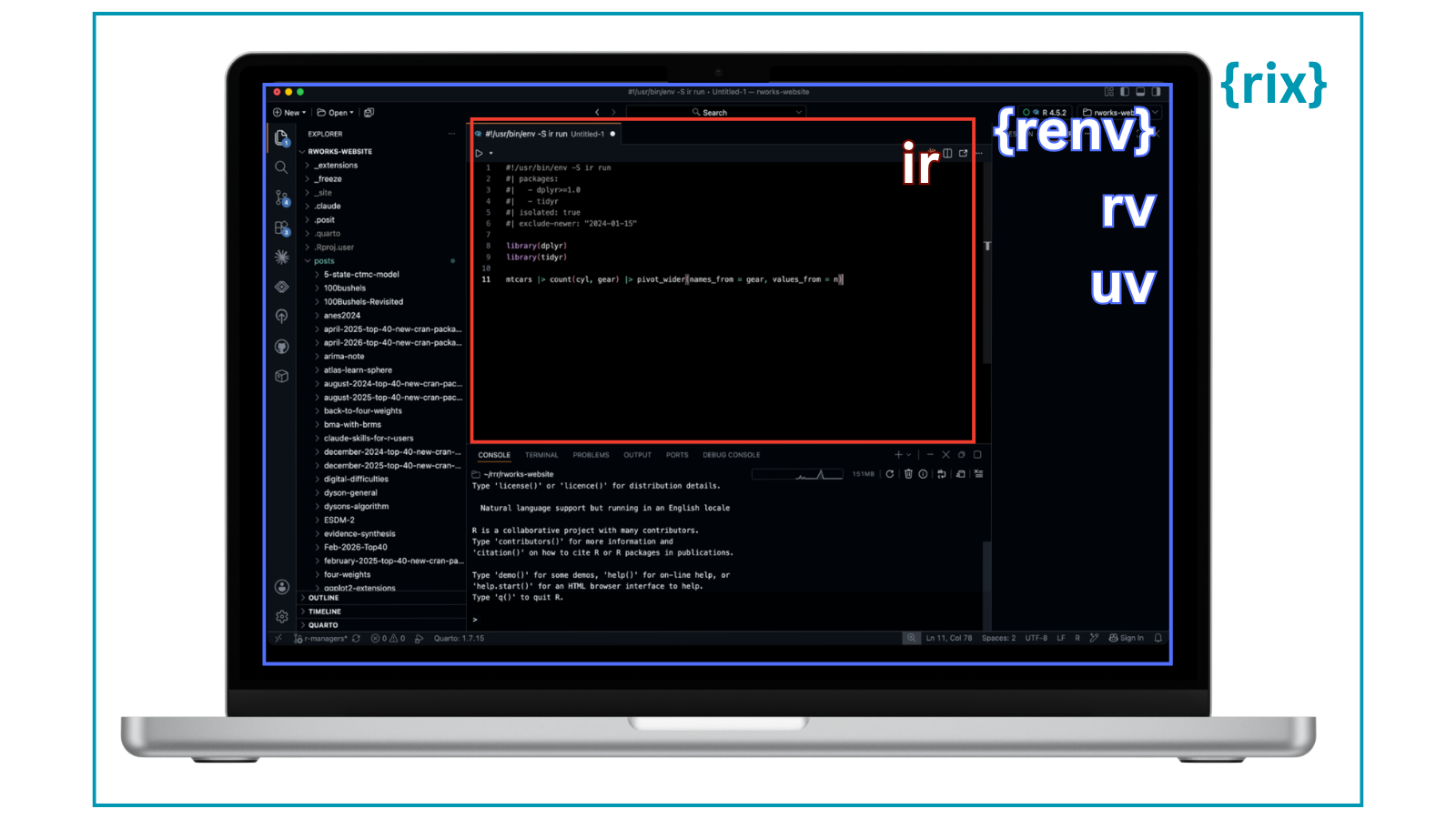
renv, rix, rv, uvr, ir: An explosion of R package and environment managers
Want to share your content on R-bloggers? click here if you have a blog, or here if you don’t.
There has been an explosion of package/environment/platform managers in the R ecosystem recently,1 and R users are really reaping the rewards of so many ripe and riveting tools. But, I’ve found it rough2 to keep track of them all and understand what they are and how they are different!
I suspect I am not the only one. My colleague Libby Heeren and I recently held a Data Science Lab with Eric Nantz to showcase rix and Nix (which was awesome! Keep an eye out on the Posit YouTube channel for when the recording is published), and the first three or so questions from the audience were all about how rix compares to X (renv, rv, uvr), and so I thought it’d be helpful to write a short summary of five tools that I’ve heard about: renv, rix, rv, uvr, and ir.3
While they’re all about tracking or isolating dependencies, they operate at a different “levels” from each other. TL;DR:
- rix snapshots the entire system environment
- renv, rv, and uvr manage R package dependencies within a single R project
- ir handles dependencies for a single R script rather than a project
I don’t want to/can’t pass judgement on which is the best or which I recommend, because I honestly haven’t had the opportunity to explore all of them fully (a very diplomatic way of saying that I haven’t yet used all of them in a real-world context), but I would love to hear everybody else’s opinions on which they think is the best tool because I imagine people have them! 😀
It’s an unsatisfactory proxy for quality/experience, but here is the GitHub star trajectory of each:

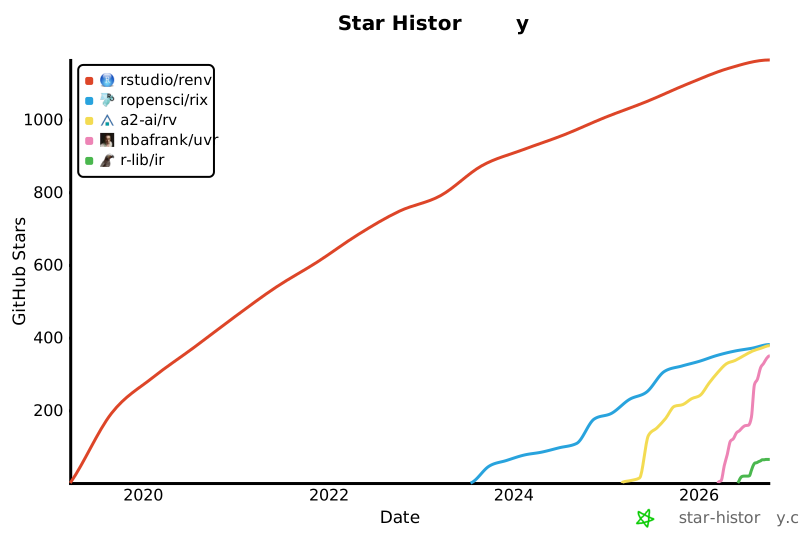
(Mind the recency bias).
With that, let’s begin, going chronologically by release!
renv
Repo | Docs | ⭐1.2k GitHub stars | ✅ Packages ❌ R version ❌ Environments
Use case
This is a long-established package supported by Posit (creators of RStudio) used for project-local R package management.
How to use renv
renv is iterative and retrospective: you install the packages first, and then take a snapshot.
- Install the renv package:
- Within a project, initialize renv:
- Install packages:
Install packages the regular way, i.e., install.packages().
When you install packages, they will be installed into a project-specific library.
- Snapshot your library’s packages into a lock file:
This lockfile captures the exact versions of those packages:
  "R":
    "Version": "4.4.2",
    "Repositories": [

        "Name": "CRAN",
        "URL": "

    ]
  ,
  "Packages":
    "dplyr":
      "Package": "dplyr",
      "Version": "1.1.4",
      "Source": "Repository",
      "Repository": "CRAN",
      "Hash": "fedd9d00c2944ff00a0e2696ccf048ec"
    ,
    "ggplot2":
      "Package": "ggplot2",
      "Version": "3.5.1",
      "Source": "Repository",
      "Repository": "CRAN",
      "Hash": "44c6a2f8202d5b7e6c72a95ca7ea1795"
- Iterate:
As you continue adding packages, continue snapshotting to update the lock file.
Some considerations
Because renv is iterative and retrospective, you can accidentally install packages that conflict with the packages that you had installed earlier.
While renv tracks your R version, it intentionally does not manage it. If you need to switch R versions, you’ll want a tool like rig. See the renv documentation for the full list of caveats.
rix
Repo | Docs | ⭐381 GitHub stars | ✅ Packages ✅ R version ✅ Environments
Use case
rix operates one level up from the other tools on this list. Instead of managing packages within an R installation, rix uses Nix, a general-purpose package manager, to snapshot an entire software environment: R itself, packages, and any system-level dependencies they need.
How to use rix
rix is retrospective but in a different sense than renv. You declare the environment you want up front, and Nix builds it from scratch (pulling from a package index rather than your currently-installed library).
- Install Nix and the rix package:
- Declare your environment:
Write a small script (e.g., generate_env.R) describing the R version and packages you need:
library(rix)

rix(
  r_ver = "4.4.2",
  r_pkgs = c("dplyr", "ggplot2"),
  project_path = "."
)
Running this script generates a default.nix file, a plain-text description of the environment.
- Build the environment:
Running nix-build creates the environment stored in /nix/store:
Then, you can drop into this environment interactively by running nix-shell.
From there, you can work normally by launching R, writing scripts, rendering Quarto docs, etc.
When you want to add a new package, edit generate_env.R and rerun that script to regenerate default.nix, and then run nix-build/nix-shellagain.
Some considerations
Because rix depends on Nix, there’s a bigger lift required to install and learn Nix itself. In exchange, you get reproducibility that extends beyond R packages to the R version and even system dependencies.
rv
Repo | Docs | ⭐378 GitHub stars | ✅ Packages ❌ R version ❌ Environments
Use case
This is a relatively new tool by A2-ai, written in the ever-so-popular Rust language, used for project-local R package management.
It supports multiple package repositories with per-package source control (e.g., forcing a specific package to build from source vs. binary), and claims large speed improvements (20x+) over renv for installs.
rv is declarative: you write your desired packages and versions into a config file, and rv resolves the entire dependency graph upfront before installing anything.
How to use rv
- Install rv:
rv is a standalone command-line tool, not an R package. There are a few installation instructions; see the documentation for more. I have Homebrew on my Mac, so I can run:
- Start a new project:
Start a new project with rv init. For example, running the below creates a new folder called hello_world:
If you open up the hello_world folder, you’ll see that rv created various files and folders in your project folder:
hello_world/
  rv/
  library/
  scripts/
    activate.R
    rvr.R
  .gitignore
  .Rprofile
  rproject.toml
- Update config file:
I don’t want to just repeat the documentation because it’s quite excellent, but essentially, you would fill in your packages as dependencies in rproject.toml:
r_version = "4.4.2"

# A list of packages to install and any additional configuration
# Examples:
    # "dplyr",
    # name = "dplyr", repository = "CRAN",
    # name = "dplyr", git = " tag = "v1.1.4",
dependencies = [
    "dplyr",
    "ggplot2"
]
- Install packages:
Then, run rv sync to install the packages in the config file, as well as all of their dependencies:
This resolves the dependency graph and writes the exact versions to an rv.lock file, something like:
[[packages]]
name = "dplyr"
version = "1.1.4"
repository = "CRAN"
source = "Repository"
hash = "fedd9d00c2944ff00a0e2696ccf048ec"

[[packages]]
name = "ggplot2"
version = "3.5.1"
repository = "CRAN"
source = "Repository"
hash = "44c6a2f8202d5b7e6c72a95ca7ea1795"
Some considerations
Because rv is declarative and resolves the whole dependency graph upfront, it’s less forgiving of “install whatever you need as you go” exploratory work that renv accommodates; you’re expected to know (or figure out) your dependencies before you can sync.
You may notice that rv’s rproject.toml has an r_version field, but this does not actually manage the R version. Like renv, rv does not download, install, or switch R versions for you (again, you’d want a tool like rig for that).
If you want a single tool that tracks both your R packages and R version, and can actually switch R versions for you, you may want to check out…
uvr
Repo | Docs | ⭐350 GitHub stars | ✅ Packages ✅ R version ❌ Environments
Use case
uvr is built by nbafrank, an independent developer. Like rv, it’s also written in Rust, and it is explicitly modeled on Python’s uv, a.k.a., the best thing to happen to the Python ecosystem in a decade.
It bundles R package management and R version management (two things that renv and rv treat separately), backed by a single lockfile (uvr.lock) that is meant to be the “source of truth” for a project.
How to use uvr
uvr, like rv, is declarative: you add packages (and optionally an R version constraint) to a manifest, and uvr resolves and locks the whole dependency graph before installing anything.
- Install uvr:
uvr is a standalone binary, not an R package (though a companion R package, uvr-r, lets you drive it from the R console instead of the terminal).
curl -fsSL | sh
- Start a new project:
mkdir my-project && cd my-project
uvr init --r-version ">=4.4.2"
This creates a uvr.toml manifest in the project folder.
- Add packages:
Each add updates uvr.toml and re-resolves uvr.lock. (uvr also supports Bioconductor and GitHub sources, e.g. uvr add DESeq2 --bioc or uvr add user/repo@main.)
- Install everything from the lockfile:
This is what generates and keeps uvr.lock up to date, capturing both the R version and package versions, something like:
r-version = "4.4.2"

[[packages]]
name = "dplyr"
version = "1.1.4"
source = "cran"
hash = "fedd9d00c2944ff00a0e2696ccf048ec"

[[packages]]
name = "ggplot2"
version = "3.5.1"
source = "cran"
hash = "44c6a2f8202d5b7e6c72a95ca7ea1795"
- Run scripts inside the isolated environment:
ir
Repo | Docs | ⭐65 GitHub stars | ✅ Packages ✅ R version ❌ Environments
Use case
ir operates one level down from the project-level tools. It’s built for single scripts or Quarto documents rather than whole projects. It’s a command-line tool for running portable R scripts and rendering Quarto documents whose package requirements (and optionally an R version) live inside the file itself for single-file workflows that don’t quite need a project, but still need to be easy to share and rerun later.
How to use ir
- Install ir:
Follow the installation instructions in the repo:
curl -fsSL | sh
- Declare requirements in the file itself:
Add frontmatter (for .qmd/.Rmd) or a header comment (for .R scripts) listing the packages and, optionally, an R version or a Posit Package Manager snapshot date:
#!/usr/bin/env -S ir run
#| packages:
#|   - dplyr>=1.0
#|   - [email protected]
#| isolated: true
#| exclude-newer: "2025-05-15"

library(dplyr)
library(ggplot2)

mtcars |> count(cyl, gear) |> ggplot(aes(x = cyl, y = gear)) + geom_col()
---
title: My report
ir:
  packages:
    - dplyr>=1.0
    - [email protected]
  isolated: true
  exclude-newer: 2025-05-15
---
- Run or render the file:
ir run script.R
ir render report.qmd
When you run or render the file, ir resolves the requirements, prepares cached package libraries, and launches R or Quarto with a runtime ready to use.
Some considerations
ir is the newest tool here (first released mid-2026) and intentionally narrow in scope: it solves reproducibility for a single file, not a whole project. So, it’s a complement to, not a replacement for, renv/rix/rv/uvr when you actually do need a shared project-level environment.
Even more package and environment managers
This is just the surface of what is available out there. The amazing Novica Nakov has created a new R tooling webpage to track new R tools as they show up. So, if you want to follow an evolving list, I recommend keeping an eye out there!
While doing my research, I ran into a few more tools that I considered adding to this post and decided to not. Here are what they are, and why I left them out:
- devenv: a general-purpose Nix-based dev environment manager, not specifically for R. It shares rix’s core mechanism but doesn’t have rix’s R-specific niceties like date-pinned CRAN/Bioconductor snapshots.
- rpx, which I discovered on this Reddit thread as I was writing this: I didn’t add it because I’d waffled on finishing this post for too long and it would have messed up my Spelling Bee game. If anybody wants to write about it for R Works, let me know!
- rig: a command-line tool for installing, listing, and switching between multiple R versions on your machine. I didn’t add it because there’s nothing to share with others (it’s more a personal R version manager), but as noted earlier, can be used to conform to the pinned R versions tracked in tools like renv or rv.
Related
PakarPBN
A Private Blog Network (PBN) is a collection of websites that are controlled by a single individual or organization and used primarily to build backlinks to a “money site” in order to influence its ranking in search engines such as Google. The core idea behind a PBN is based on the importance of backlinks in Google’s ranking algorithm. Since Google views backlinks as signals of authority and trust, some website owners attempt to artificially create these signals through a controlled network of sites.
In a typical PBN setup, the owner acquires expired or aged domains that already have existing authority, backlinks, and history. These domains are rebuilt with new content and hosted separately, often using different IP addresses, hosting providers, themes, and ownership details to make them appear unrelated. Within the content published on these sites, links are strategically placed that point to the main website the owner wants to rank higher. By doing this, the owner attempts to pass link equity (also known as “link juice”) from the PBN sites to the target website.
The purpose of a PBN is to give the impression that the target website is naturally earning links from multiple independent sources. If done effectively, this can temporarily improve keyword rankings, increase organic visibility, and drive more traffic from search results.
Streaming Film
Nonton Film gratis
Jasa Backlink
Download Anime Batch